
Choose a setlist app
Evaluate a setlist maker around song order, repertoire, key, tempo and stage readability, using a small concert or rehearsal example.
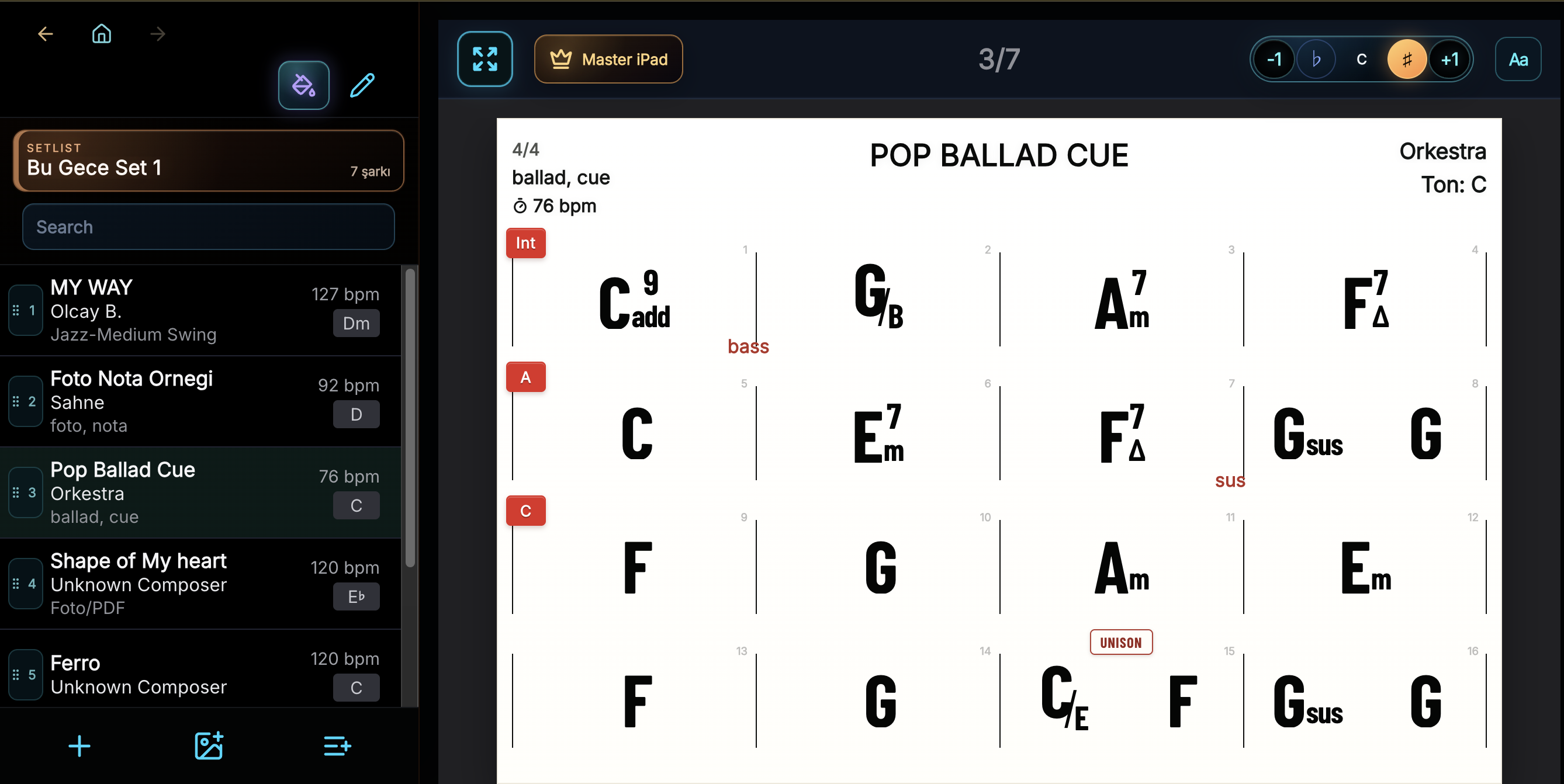
Choose the set you will prepare
Start choosing a setlist app by considering where you will play. An acoustic performance, a dance-focused concert and a rehearsal of new material need different orders. Describe the duration, players and instrument changes. Use that real preparation task when evaluating an application.
Five songs make a useful trial: an opener, two middle songs, a change of pace and a closing number. This gives you a manageable way to assess the workflow. Pay attention to the difference between listing titles and reaching the preparation information you need while playing.
Separate repertoire from a set
Your repertoire is the archive of songs you work on. A setlist is the order selected for one performance. When you play a song at different concerts, you may need to return to its preparation details. Try finding a song in your archive and using it in a new set.
In FeraStage, Songs is intended for repertoire and Setlists for concert or rehearsal order. Begin with a few songs, checking their key and tempo details. Establish consistent naming in this small example before moving on to the rest of your repertoire.
Test a change of order
Performance plans can change in rehearsal. A vocalist’s break, a guitar change or a venue’s timing request may move a song. Swap two songs in the example and assess the new transition. Check that the application’s order matches the band’s latest decision.
Allow for speaking and breaks in the overall running time. A duration or tempo field does not by itself establish how long the concert will take. Consider an extended solo, audience interaction and an encore separately. Playing the sequence through tests the plan against the performance.
Check the performance view
Readability during a performance matters alongside the preparation screen. On your intended device, try finding the next song, entrance information and necessary notes. Brightness, device position and reading distance can reveal needs that were less apparent at a desk.
If you use a click, check song order and tempo preparation together. FeraStage Click Setlist can be explored as a separate tempo workspace. Try the actual output and connections in rehearsal. If you plan disconnected use, open the required content on your device and test that condition too.
Review the five-song trial
Before choosing a setlist workflow, review your example using these questions:
- Could I prepare separate concert and rehearsal orders?
- Could I reorder songs and follow the transitions?
- Could I find the necessary key, tempo and preparation details?
- Could I see the next song on my stage device?
- Did I check saving, reopening and account requirements?
Bring it into FeraStage
Explore the product overview in English, then begin with a small example. Account and workspace screens may be presented in Turkish.
Explore FeraStage’s setlist makerCreate your account